
 Денис Артемьев
 The high-tech video surveillance market is growing rapidly. However, an average user is interested in wide modern possibilities only at the minimum price. And such a solution exists – video surveillance via phone.
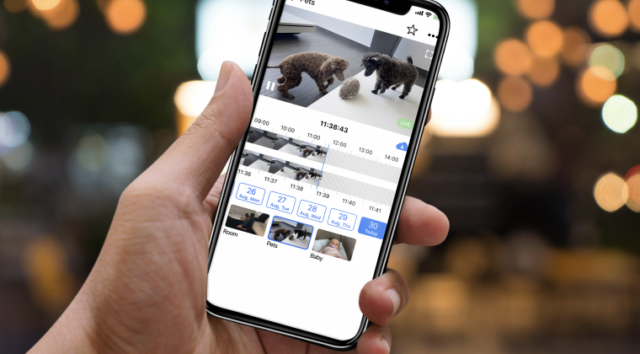
Today we will talk about securing your home, family members and business using regular mobile phones with cameras and the Faceter application.
Peculiarities of video surveillance via phone
Not many people know that an outdated phone can get a second chance and become an irreplaceable assistant for ensuring the safety of a residential or non-residential facility, as well as material values, life and health of people.
How do I arrange video surveillance via phone?
Look through your old devices. If you have a smartphone with Internet access and a 1.3 MP camera, with a processor, operating system, screen and charging socket in working order, then it can be used for video surveillance. It doesn’t matter at all that the operating system is outdated, downloading takes too long, or the device is slow.
To work as a video camera, the type of the software and the appearance of the device are not important. More information about what phone is suitable for video monitoring can be found in the article “What to do with an old smartphone: 5 examples of useful applications.”
The most important advantages of video surveillance via phone:
- Minimum device requirements. The device needs to work as a camera, not freeze and have access to the Internet.
- Independence from electricity and the possibility of increasing the battery capacity. Unlike a standard video surveillance system that uses IP cameras, any phone has a built-in battery that can be replaced, upgraded, or connected to a solar panel or external power source. IP cameras require additional equipment – a battery or a stable power supply.
- Built-in Internet module (3G or 4G). Difficulties arise if video surveillance is required at remote sites where there is no wireless connection. With a phone such difficulties are non existent as you can connect to a 3G/4G network.
- Geolocation. This built-in option provides the exact location of the device, even when on the move.
- Multifunctionality. Read about it here and in the “Areas of application” chapter.
- Cheapness and availability. How to set up video surveillance through a phone for free? Everything is simple. You only need two working smartphones + the Faceter mobile application, which can be downloaded for free from Google Play or the App Store, taking into account the operating systems of the phones.
- Easy to configure. It takes no more than 30 minutes to set up the complete video surveillance system.
- Security. When configured properly, your old smartphone with the software by Faceter will become more reliable than any IP video surveillance system. Detailed instructions can be found in the article “Turning an old smartphone into a surveillance camera.”
Areas of application
Even an outdated phone can be used in:
- Surveillance of residential/non-residential facilities in order to protect and preserve material values for home and for business (restaurant, store, warehouse, office, construction site, housing cooperative).
- Monitoring children, elderly/sick relatives or naughty pets (baby monitor).
- Monitoring of workers (work stimulation).
- Operating as a dashcam.
- Other methods of surveillance.
Mobile application
To set up an optimal video surveillance system via phone, just download the free Faceter mobile application and install it on two phones. If you have an Android phone, you can download it from here, if an iOS device, then from here.
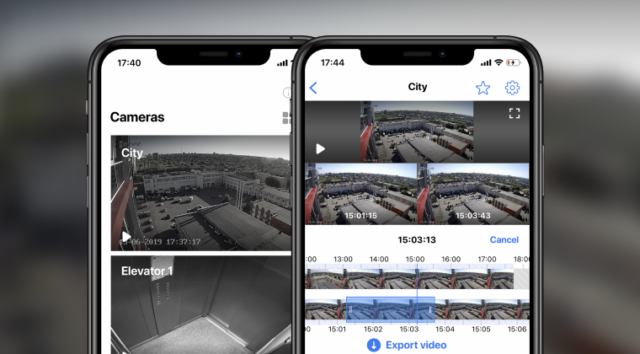
IMPORTANT: for the application to work, version 10.0 or higher of the iOS operating system (compatible with iPhone, iPad and iPod touch), and version 5.0 or higher for Android, are required. The newer the software version, the more stable the video monitoring system.
Preparing the device
The algorithm of actions for preparing your mobile device:
- Check the phone’s condition. The processor, screen, camera (at least 1.3 MP), charging socket must be in working order.
- Reset to factory settings. This helps to get rid of unnecessary applications that can slow down the device and fix most of the system crashes.
- If the operating system does not meet the minimum requirements (10.0 and 5.0 for iOS and Android, respectively), then the software must be updated.
- Install the Faceter mobile application.
- If the battery is in a bad condition, you need to deal with the power supply situation for your phone.
These simple steps are enough to organize video surveillance via smartphone.
4 principles of proper video surveillance via phone
How to connect video surveillance through a phone? This question can be covered in 4 organizational principles of any video surveillance system:
Choosing a reliable service provider.
The best option would be cooperation with Faceter, due to such advantages as general availability, ease of installation, multifunctionality and safety.
2. Setting the goals.
What is video surveillance needed for? For home or business? Which facilities or actions of people need to be monitored?
3. Defining the budget.
Taking into account the financial opportunities and set goals, you can choose the free video surveillance option or one of the following Faceter tariff plans.
4. Choosing a way to store the archived recordings.
Cloud or standard video storage.
Instead of a conclusion
A video surveillance camera via phone is a modern and optimal solution for home and business. Use a few regular smartphones to avoid the high costs of video surveillance. This method has full functionality, provides the capabilities of online video monitoring and recording of the events. It is enough to install the Faceter application on your phone, place the device at the desired point, and use a second phone as a monitor.
Еще больше обзоров, кейсов и полезной информации о видеонаблюдении в нашем официальном Telegram-канале. Подписывайтесь, чтобы оставаться в курсе важных событий.